
Установить приложение
Как установить приложение на iOS
Следуйте инструкциям в видео ниже, чтобы узнать, как установить наш сайт как веб-приложение на главный экран вашего устройства.
Примечание: Эта функция может быть недоступна в некоторых браузерах.
-
Скачивание файлов платно! Купить Доступ
Вы используете устаревший браузер. Этот и другие сайты могут отображаться в нем неправильно.
Необходимо обновить браузер или попробовать использовать другой.
Необходимо обновить браузер или попробовать использовать другой.
Успешное применение Octoplus Huawei Tool Информация
- Автор темы uploads
- Дата начала
Добро пожаловать! Вас пригласил Hromrocker присоединиться к нашему сообществу. Пожалуйста, нажмите сюда зарегистрироваться.


Успешно снят FRP с Huawei Y5 Lite (DRA-LX5)
Вложения
-
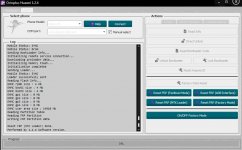 200 КБ Просмотры: 29
Успешно снят FRP с Honor 20 Pro (YAL-L41) 10.1.0.258(C10)
Вложения
-
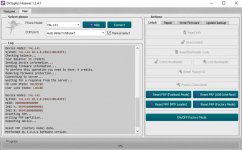 119,2 КБ Просмотры: 38
Успешно снят FRP с Honor 9X (STK-LX1) 10.0.0.208(C10)
Вложения
-
 220,7 КБ Просмотры: 37
Успешно снят FRP с Huawei P Smart Pro (STK-L21) 10.0.0.403(C432)
Вложения
-
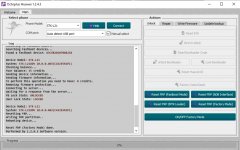 227,8 КБ Просмотры: 20
Успешно снят Huawei ID с Honor 9A (MOA-LX9N) 3.1.0.202 (C10)
Вложения
-
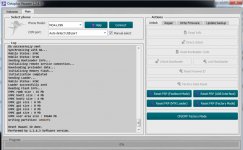 233,9 КБ Просмотры: 44
Успешно снят Huawei ID с Honor V8 (KNT-AL10) (C00)
Вложения
-
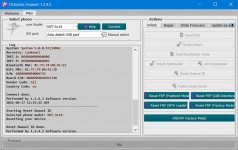 123,9 КБ Просмотры: 24
Успешно снят Huawei ID с Honor 9S (DUA-LX9)
Вложения
-
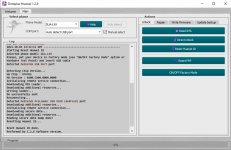 227,2 КБ Просмотры: 25
Успешно снят Huawei ID с Huawei P40 Lite (JNY-LX1)
Вложения
-
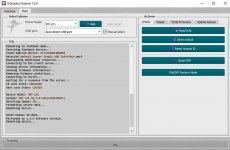 102,7 КБ Просмотры: 48
Успешно снят FRP с Honor 20 (YAL-L21) на 11.0.0.162
Вложения
-
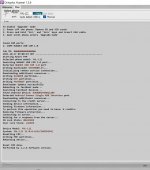 156,5 КБ Просмотры: 25
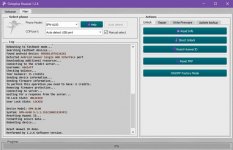
Успешно снят Huawei ID с Huawei Nova 5i Pro (SPN-AL00)
Вложения
-
 105,3 КБ Просмотры: 21

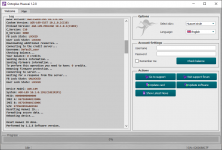
Успешно снят Huawei ID с AGR-L09 (Kirin710a). Модели нет в списке, выбираем PPA-LX2
Считанный дамп + серт прикрепил.
https://gsmforum.ru/resources/arg-l09.6104/
Считанный дамп + серт прикрепил.
https://gsmforum.ru/resources/arg-l09.6104/
Вложения
-
 70,3 КБ Просмотры: 45


Драсььььььььььььььте
Внесу и свою лепту
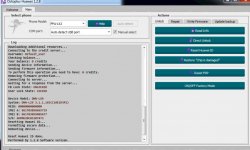
DNN-LX9 Так же успешно разблокирован от Huawei ID
Внесу и свою лепту
DNN-LX9 Так же успешно разблокирован от Huawei ID
Вложения
-
 92,9 КБ Просмотры: 104

AKA-L29 (Honor 9C) удоление Huawei ID

[MODDED=andrei_d1978] Тема предназначена для выкладывания логов и(или) скриншотов софта только для успешных операций. [/MODDED]
Драсьььььььььььььььььте
Да , AKA-L29 Делается с помощью Huawei Octoplus Tools
на версии и ниже выше
Param invalid не получить , всё работает отлично
Kirin 710a
Мой мультик работы тут
Да , AKA-L29 Делается с помощью Huawei Octoplus Tools
на версии и ниже выше
Param invalid не получить , всё работает отлично
Kirin 710a
Мой мультик работы тут
я новичок. вопрос может глупый, но все же. то что с 336 снял фрп, это же не значит, что с 360 снимет? спасибо заранее
Honor 30 pro + Remove huawei id
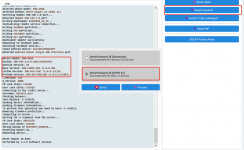
Уточнить , после сброса получили Param invalid или нет , сброс Huawei ID то мелочи , и что модель выбирали EBG-AN10 То понятно. А вот после вашего сброса ставиться ли пароль на экран?
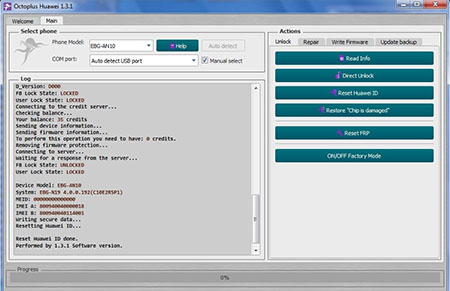

FRP Huawei Honor 7A Pro
Успешный мультик про VOG-L29 12.0


Huawei Nova 10 SE BNE-LX1 Huawei ID
Выбрал модель JLN-LX1
Starting Reset Huawei ID
Selected phone model: JLN-LX1
Warning: Please, make sure the phone`s battery is fully charged and connected, after connect the device via Factory Mode (use Hardware Test Point or "ON/OFF Factory Mode option").
Warning: Selected response: Proceed
Searching Qualcomm HS-USB QDLoader 9008 port...
Please, reconnect battery, connect USB cable with attached Test Point on your phone!
Detected Qualcomm HS-USB QDLoader 9008 port
Connecting to device...
Hadshaking...
Sending loader Qualcomm Snapdragon 680V.0.mbn...
Loader send successfully
Reconnecting, please wait...
Configuring device...
Reading partition table...
Creating backup...
Backup saved to JLN-LX1_BACKUP_FIRMWARE_2025-12-17_16-21-59.
Searching for Huawei Id protection...
Resetting Huawei Id...
Performing factory reset...
Please perform the factory reset operation manually through the recovery mode if the operation was not done automatically
Reset Huawei ID done.
Performed by 1.3.5.5 Software version.
Выбрал модель JLN-LX1
Starting Reset Huawei ID
Selected phone model: JLN-LX1
Warning: Please, make sure the phone`s battery is fully charged and connected, after connect the device via Factory Mode (use Hardware Test Point or "ON/OFF Factory Mode option").
Warning: Selected response: Proceed
Searching Qualcomm HS-USB QDLoader 9008 port...
Please, reconnect battery, connect USB cable with attached Test Point on your phone!
Detected Qualcomm HS-USB QDLoader 9008 port
Connecting to device...
Hadshaking...
Sending loader Qualcomm Snapdragon 680V.0.mbn...
Loader send successfully
Reconnecting, please wait...
Configuring device...
Reading partition table...
Creating backup...
Backup saved to JLN-LX1_BACKUP_FIRMWARE_2025-12-17_16-21-59.
Searching for Huawei Id protection...
Resetting Huawei Id...
Performing factory reset...
Please perform the factory reset operation manually through the recovery mode if the operation was not done automatically
Reset Huawei ID done.
Performed by 1.3.5.5 Software version.
Похожие темы
-
-
-
-
Купил активацию Huawei Tool и не могу восстановить Huawei P30 Вопрос
- Автор sunny70
- Ответы: 12
-
Успешное применение Octoplus FRP Tool Xiaomi флешера Решено
- Автор uploads
- Ответы: 2
Поделиться: